


If you have any technical questions or concerns, go to My Esri or email your enquiries to support@esrisingapore.com.sg.
FAQs
- How do I authorise my newly purchased Desktop licenses?
- Open the start menu and select “ArcGIS Administrator”. Then select the desired product folder (i.e. “desktop” or “engine”).
- Select a single product.
- Click “Authorise now” to start the Software Authorisation Wizard.
- Select “I have received an authorisation file from Esri…” and navigate to the provision file you received. If you do not have a provisioning file, select “I have already installed my software and need to authorise it”.
- Select “Authorise with Esri now using the internet” and click “Next”.
- Complete the authorisation information and click “Next”. If you are using a provision file the details should be pre-filled, but you can still edit it when needed.
- Complete the Software Authorisation Number form and click “Next”. If you are using a provision file the details should be pre-filled, but you can still edit it when needed.
- Complete the Authorise Software Extensions form and click “Next”. Then click “Next” in the following screen if you do not want to evaluate any extensions.
- Click “Finish” to complete the software authorisation process.
- How can I deauthorise single use licenses?
- Open the start menu and select “ArcGIS Administrator”.
- Once the ArcGIS Administrator dialog box appears, click “Deauthorise”, then click “Yes” to continue.
- Once the Software Authorisation Wizard dialog box appears, select “Deauthorise with Esri now using the internet” and click “Next”.
- Click “Finish” after successful completion.
- How can I access My Esri?
You can access My Esri by visiting the website (https://my.esri.com/). This will re-direct you to the sign in page for your Esri account. If you do not have an account, you will be prompted to create one.
The website uses tabs to organise information. All licensing, software, and support functionality is stored under the “My Organisations” tab.

- What if I cannot see the "My Organisations" tab in My Esri?
If you cannot access this tab, your account does not have the correct permissions to view any organisations. There are several different options to resolve this issue:
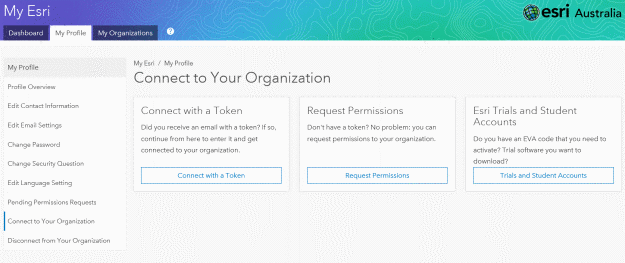
- If you have recently purchased software, you will receive an email with a link to connect to your organisation. You may also receive a token which can be manually entered to enable visibility of the “My Organisations” tab for your account (this option can be found by navigating to: My Esri > My Profile > Connect to Your Organisation > Connect with a Token).
- If you are a new user, you can use My Esri to request permissions to connect to an organisation. Note that you can be connected to multiple organisations if necessary (this option can be found by navigating to: My Esri > My Profile > Connect to Your Organisation > Request Permissions).
- Or you can talk to your primary maintenance contact or administrator, and ask them to either invite you as a new user or grant you permission to view your organisation. If you are the primary contact and you need instructions on this process, please contact Esri Singapore Support.
- If you have an Esri trial, a temporary license from an Esri Press book or workbook, or a student trial, you are not eligible to view organisation information on My Esri and therefore do not need to be connected to an organisation. Instead, please visit Esri’s trial site for information on how to activate your trial software; or visit the Esri Press site for free trials related to workbook; or visit Esri’s Student Trial site to activate your student edition software.
- If none of the previous options resolved your connection issue, please contact Esri Singapore Support on: 6742 8622 with your customer number and username.
- How do I invite users to my organisation in My Esri?
Administrators may invite users to connect to their organisation within My Esri (this option can be found by navigating to: My Esri > My Organisation > Users > Invite Users). This involves a four step process outlined below:
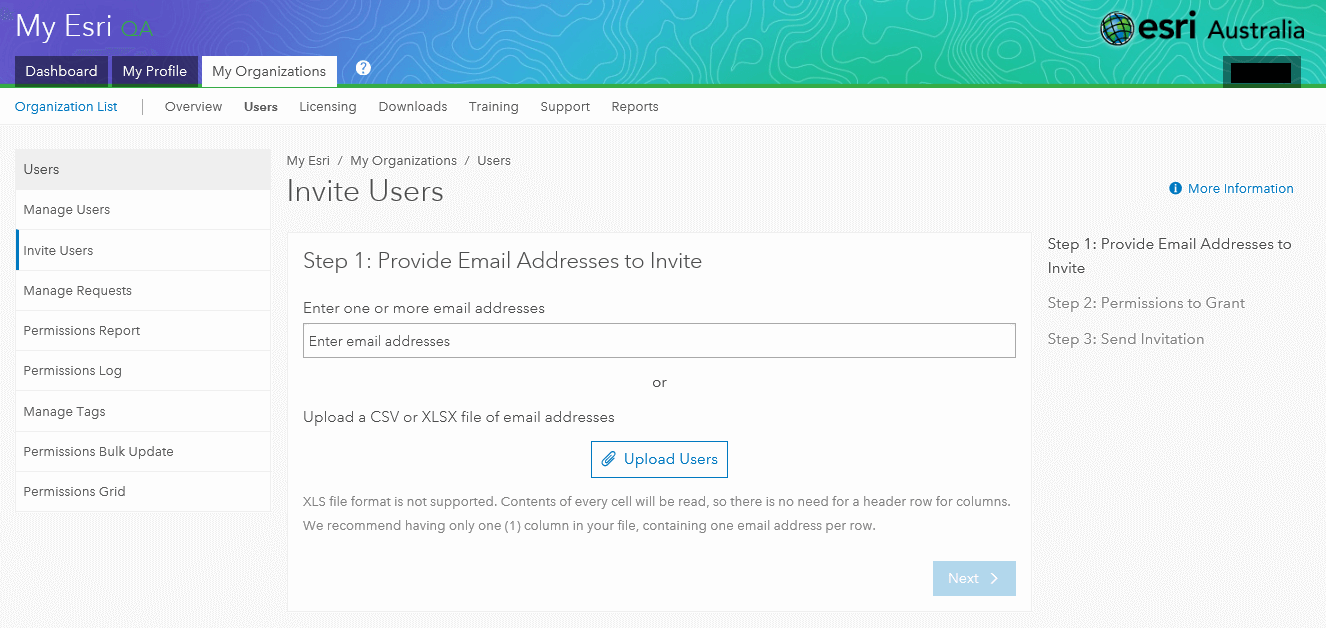
Step 1: Provide Email Addresses to Invite – Either provide a single email address for a single user, or upload a CSV or Excel table (XLSX file) with one column of email addresses (one per row).
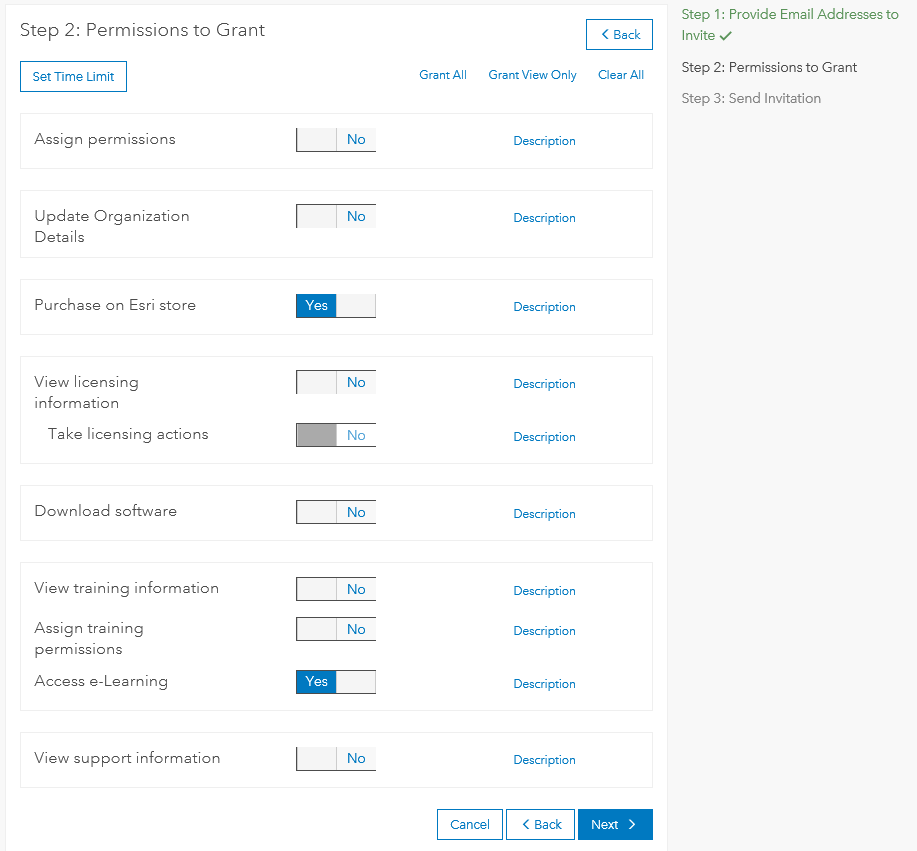
Step 2: Permissions to Grant – Permissions denote what the user is able to see within My Esri. This includes the ability to grant or take away the ability to see the tabs for “Downloads”, “Licensing”, “Training” and if they can assign permissions as an administrator. Please click on the word “description” next to each permission to see a thorough description of the permission. You may also set a time limit for permissions, which may useful when employing contractors or students who only need access for a specified period of time.
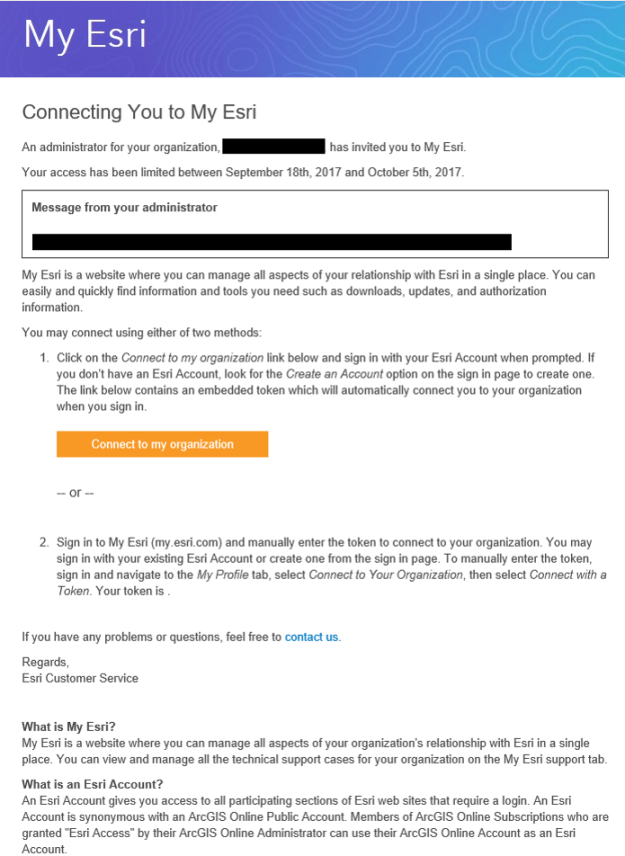
Step 3: Send invitation – An email will now be sent to the user’s email address, with a link to connect to the organisation. When the invited user clicks on the link within the email and signs in to My Esri, their username is added to the pending permissions and these are made active. Invitations that are unanswered after six weeks will be deleted. Before the email is sent, you can change the language and message content sent to the user. You can also preview the email before it is distributed.
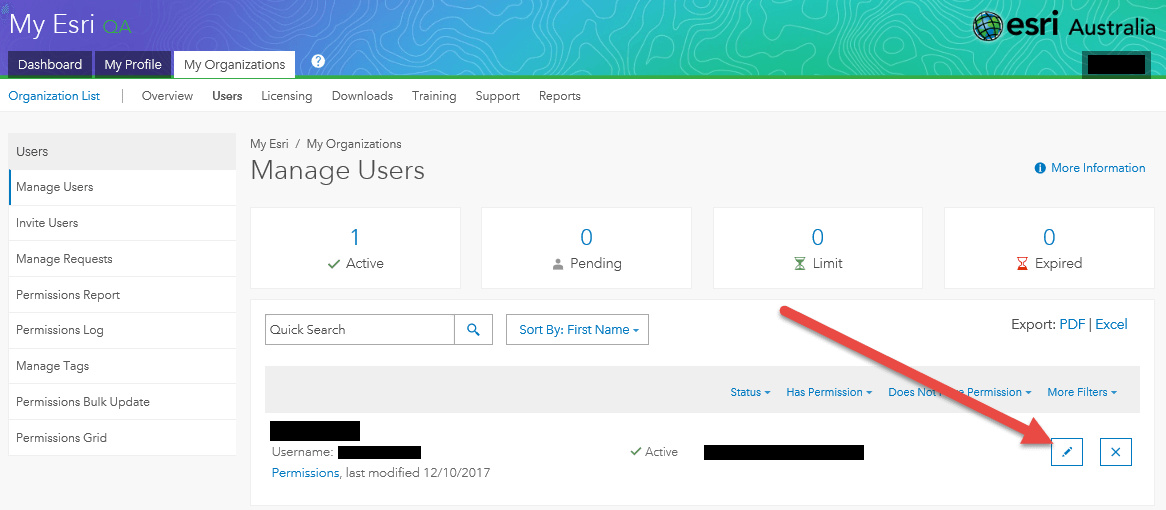
Step 4: Manage permissions – Lastly, administrators can change permissions for users at any time by accessing “Manage Users”, and selecting the pen icon. This will direct you to the permissions page outlined in Step 2.
- How do I log a support call through My Esri?
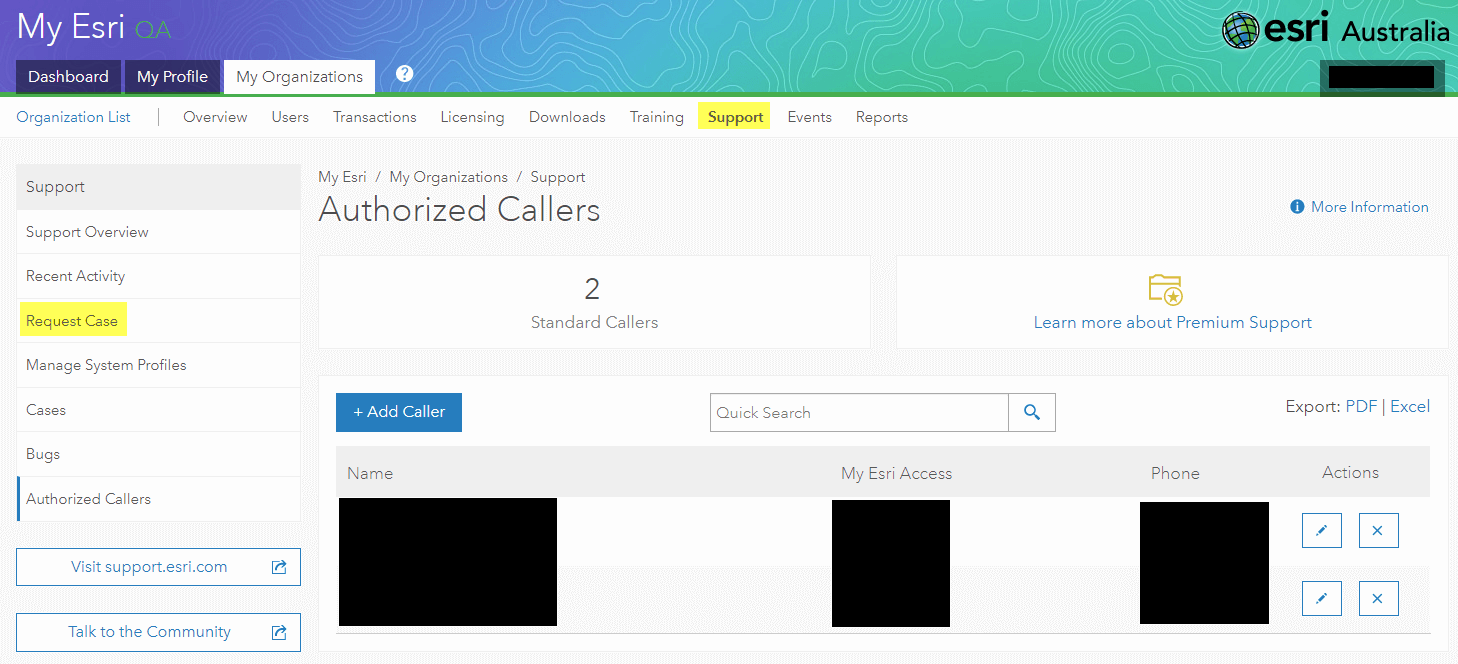
Use the Request Case form to contact Support Services about issues you are having (this option can be found by navigating to: My Esri > My Organisation > Support > Request Case). The form is available from the Support tab to those who are designated as authorised callers (see below). If you don’t see the link to the form, you may not be an authorised caller. Contact your organisation’s My Esri administrator to verify your permissions.
The Request Case form will create a new case that records all the technical notes, documentation, and related interactions between you and a support analyst for a given technical issue. Cases are tied directly to your organisation.
- How do I reset lost licenses in My Esri?
If any of your licenses are no longer accessible due to system failure, system loss, or destruction, the Recover Lost Licenses page is a new way to reset your licenses (this option can be found by navigating to: My Esri > My Organisation > Licenses > Recover Lost Licenses). Note, you must have the “Take Licensing Actions” permission granted to see this form.
On this page, you’ll be led through finding the crashed/lost/damaged machine, either by the products activated on it or using the UMN ID, and then recovering of the lost licenses. The license recovery process requires the signature of the organisation’s License Administrator in a Certificate of Destruction. This process is irreversible and should only be used as the absolute last option when all other solutions to rectify the problem have failed. In addition, if a license has already been returned once through My Esri, they will not be eligible for another return.
It is recommended to always deauthorise licenses before upgrading operating systems or moving software to a new machine.
- How can I troubleshoot incidents?
Please follow these steps before you contact the technical support team:
- Verify the source of the incident by confirming if it resulted from an Esri software error message. If the problem resulted from the database, hardware, or network software of another vendor, Esri Malaysia will work with you, and the other vendor, to solve it.
- Carefully repeat the process to ensure the technical incident was not caused by misstep or human error.
- Determine whether the problem occurs on one, more than one or all your workstations/servers.
- Determine whether the problem is specific to one, more than one or all of your datasets.
- Determine whether the problem occurs randomly or consistently.
- Check any recent changes in your computing environment that could have potentially caused the problem. Kindly consider checking the following:
- Version of the product, database, operating system and network software
- Client or server components
- Server configuration
- Security settings
- What can I do if I encounter an issue when working with ArcGIS Online, ArcGIS Pro or ArcGIS Enterprise?
See the technical enquiries for the following ArcGIS products.